Posted by shreya tevatel
Filed in Technology 2 views
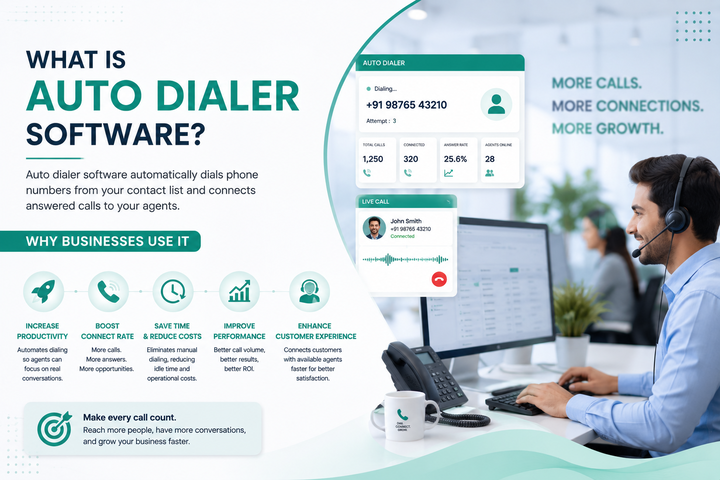
Every call center runs on time. Agents only have so many hours in a shift, and every minute spent dialing a number by hand is a minute not spent talking to a real customer. This is the exact problem that auto dialer software was built to solve. It takes the manual work out of dialing and hands agents a steady stream of live calls instead.
At its core, auto dialer software is a tool that dials phone numbers automatically from a stored list, instead of making a person press each digit by hand. Once a call connects, the system either plays a recorded message or passes the call straight to a live agent. Businesses use this kind of tool for sales calls, customer support, appointment reminders, surveys, and debt collection follow-ups. Anywhere a company needs to reach a lot of people by phone, an auto dialer can make that job faster and easier.
Before auto dialer software became common, agents dialed every number themselves. They would look up a contact, type the number, wait for it to ring, and then hang up if no one answered. Multiply that by hundreds of calls a day, and you can see how much time gets wasted. Studies on call center productivity have shown that agents using manual dialing methods spend a large chunk of their shift just waiting for calls to connect or ring out. That time adds up fast across a team of ten, fifty, or five hundred agents.
An auto dialer removes almost all of that waiting. It dials the next number the moment an agent is free, skips numbers that are busy or disconnected, and only connects an agent when a real person picks up. This one change can double or even triple the number of live conversations an agent has in a single day.
So how does an auto dialer actually work? The process is simpler than most people expect. First, a business uploads a list of phone numbers into the system. This list might come from a customer database, a lead generation form, or an old spreadsheet of contacts. Once the list is loaded, the software starts working through it based on rules the business sets ahead of time.
The dialer places calls one after another, or several at once, depending on the type of auto dialer solution being used. When someone answers, the software checks whether it was a human voice or a voicemail or answering machine. This step is called answer detection, and it matters because businesses don't want agents wasting time on messages that went to voicemail. If a live person answers, the call routes to an available agent right away. If no one answers, the system logs the result and moves to the next number on the list.
Behind the scenes, the software also tracks call outcomes. It records whether a call was answered, missed, busy, or dropped. This data helps managers see how well a campaign is performing and where they might need to make changes.
Not every auto dialer works the same way. There are a few common types, and each one fits a different kind of business need.
Preview dialer shows the agent details about the next contact before the call goes out. The agent looks over the information, then chooses when to place the call. This type works well for sales teams that need a bit of context before talking to someone, like a loan officer reviewing a customer's account history.
Progressive dialer moves faster. It dials the next number as soon as an agent finishes their current call, without waiting for the agent to review anything first. This keeps the pace steady and cuts down on idle time between calls.
Predictive dialer is the most advanced of the three. It uses call data and math to guess how many calls it should place based on how many agents are free and how often people tend to answer. It might dial three or four numbers for every one agent, betting that not everyone will pick up. When more people answer than expected, some calls get dropped or placed on hold, which is why predictive dialer software need careful setup to avoid frustrating customers with silence on the line.
There are also robocall-style dialers that skip agents completely and play a recorded message to everyone who answers. These are common for appointment reminders, weather alerts, or simple notifications where no live conversation is needed.
Auto dialer solutions rarely work alone. Most businesses plug them into a larger system of call center software that handles everything from call routing to agent scheduling to reporting. Think of the auto dialer as one part of a bigger toolkit. The dialer handles outbound calls, while other parts of the software manage inbound calls, track agent performance, and store customer records.
This is where the line between an auto dialer and full call center software starts to blur. Modern call center software often has dialing built right in, along with features like call recording, live call monitoring, and scripts that pop up on an agent's screen during a call. A sales team might use the dialer to reach leads, while the same platform handles customer service calls coming in from the other direction.
Larger organizations often go a step further and invest in full contact center solutions. These systems combine phone calls with other channels like email, live chat, and text messages, all managed from one place. A customer might start a conversation over chat and finish it over the phone, and the agent can see the full history without switching between different programs. Contact center solutions give managers a complete picture of every customer interaction, not just the phone calls.
The biggest reason companies adopt this kind of technology is time. Agents spend more of their shift actually talking to people instead of waiting on hold or listening to a ring with no answer. This means more sales calls made, more support tickets closed, and more appointments confirmed in the same amount of work hours.
Cost savings follow close behind. Fewer wasted minutes means a company can handle the same call volume with a smaller team, or handle a much larger volume with the same team size. For businesses running large outbound campaigns, this can mean real savings on staffing costs each month.
Accuracy improves too. A person dialing numbers by hand will eventually make a mistake, whether it's a wrong digit or a call to a number already marked as do-not-call. Software doesn't get tired or lose focus the way people do. It follows the rules set for it every single time, which helps businesses avoid compliance problems and keeps call lists clean.
Reporting is another quiet benefit that often gets missed. Every call placed through the system gets logged, timestamped, and tied to an outcome. Managers can look back at the data and see which campaigns worked, which agents are performing best, and where calls tend to drop off. That kind of insight is hard to get from a team dialing manually with no shared tracking system.
Not every business needs the fastest or most advanced dialer on the market. A small support team handling appointment reminders might do just fine with a basic system, while a large sales floor making thousands of calls a day will need something built for scale. It helps to think about call volume, team size, and the type of calls being made before picking a tool.
Rules around phone calls also matter a lot. Many regions have strict laws about automated calls, especially predictive dialers that can leave people with dead air when a call connects but no agent is ready. Businesses need to check local regulations and make sure whatever system they choose follows them closely. A good provider will build these compliance checks into the software itself, rather than leaving it up to the business to figure out on its own.
Auto dialer software has become a standard part of how businesses handle high call volumes. It saves time, cuts down on wasted effort, and gives managers real data to work with. Whether a company needs a simple tool for outbound reminders or a full contact center setup that ties phone, chat, and email together, the right choice depends on the size of the team and the kind of calls they need to make. For any business that relies on the phone to reach customers, this kind of software is no longer a luxury. It is simply how the work gets done.