Posted by Peter Jacob
Filed in Technology 4 views
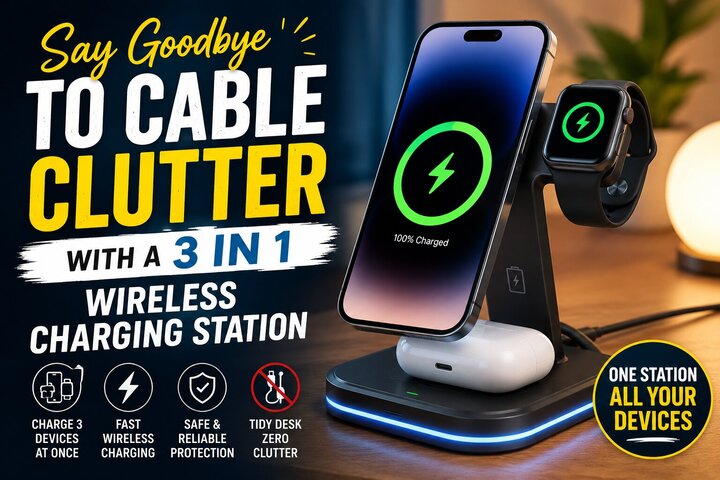
Walk into almost any modern bedroom, home office, or living room and you'll probably find the same little problem: charging cables everywhere.
There's a cable beside the bed, another one on the desk, one connected to a power adapter, and perhaps another hiding behind a nightstand. Add a smartphone, smartwatch, and wireless earbuds to the mix, and keeping everything charged can quickly turn into a daily game of cable untangling.
A 3 in 1 wireless charging station offers a simple way to bring some order to that routine. Instead of keeping separate charging cables for several compatible devices, you can place them together on one organized charging station.
The idea isn't complicated. One charging setup handles multiple devices while reducing the number of loose cables around your workspace or bedside table.
But is it actually useful? How does it work? What should you look for before choosing one? And can it really make your everyday routine easier?
Let's take a closer look.
A 3 in 1 wireless charging station is a multi-device charging accessory designed to charge several compatible devices from one central location.
The exact combination varies by design, but many stations are intended for three common categories:
Instead of plugging a separate cable into each device, you place compatible devices on their designated charging areas.
This creates a more organized charging setup and can reduce the number of cables needed on your desk or nightstand.
However, wireless charging doesn't mean every device will automatically work with every station. Compatibility remains one of the most important things to check before buying or using one.
Cables seem harmless when you only have one or two.
The trouble starts when several devices require charging at different times.
A typical setup might include a phone cable, watch charger, earbud cable, laptop cable, and spare charging cable. Even if each cable serves a purpose, the collection can make a small space look messy.
Cable clutter can also create practical problems.
You might:
A centralized charging station doesn't eliminate every cable in your home, but it can make one particular charging area much easier to manage.
The charging process is relatively straightforward.
You connect the charging station to a suitable power source. The station then provides charging power through its designated charging surfaces or holders.
Depending on the design, your phone may rest flat or stand upright. A smartwatch may sit on a dedicated charging section, while earbuds can rest on a separate charging pad.
When compatible devices are correctly positioned, charging begins.
The exact charging speed depends on several factors, including the device, charging standard, power adapter, and design of the station.
That's why it's important not to assume that every wireless charging station provides identical performance.
The most obvious advantage is organization.
Imagine arriving at your desk in the evening and placing your phone, watch, and earbuds in one location.
There's no need to search for three separate cables.
The devices have designated positions, making the entire process more predictable.
This can be especially useful on a bedside table.
Instead of waking up to a phone cable hanging over the edge, a watch charger sitting beside the lamp, and an earbud cable crossing the table, you can keep your charging devices in one compact area.
It's a small change, but small changes can make everyday spaces feel noticeably cleaner.
Your nightstand often has limited space.
There's usually already a lamp, book, glass of water, or other personal items competing for room.
Adding several charging cables can make the area feel crowded.
A 3 in 1 wireless charging station can consolidate several charging tasks into one place.
You can create a simple nighttime routine:
In the morning, your devices are in the same location instead of being scattered around the room.
Cable management isn't just about appearance.
A cluttered desk can make everyday tasks less convenient.
If you're working from home, studying, or managing multiple devices, having chargers spread across your workspace can take away valuable room.
A charging station gives those devices a dedicated location.
When your phone isn't charging, the station can also act as a consistent place to keep it.
That reduces the chance of leaving your phone under papers, behind a monitor, or somewhere else you might forget.
Modern technology often means carrying several devices throughout the day.
You might use your smartphone for communication, a smartwatch for notifications and fitness tracking, and wireless earbuds for calls or entertainment.
Each device may need charging at a different time.
Instead of treating every device as a separate charging project, a multi-device station lets you establish one charging routine.
That's particularly useful at the end of the day.
Rather than asking, "Where did I put my watch charger?" you know exactly where your devices belong.
It's worth clearing up a common misconception.
A wireless charging station still needs a power connection.
The station itself normally connects to a power source through a cable.
The difference is that you don't need to plug a separate cable directly into each compatible device.
So the goal isn't to eliminate every cable from your setup.
The goal is to reduce cable clutter and centralize charging.
That distinction matters when deciding whether a wireless station is right for you.
Before purchasing a 3 in 1 wireless charging station, check whether your devices support the required wireless charging standards.
Different smartphones, watches, and earbuds can use different charging technologies.
A station may support wireless charging for one category of device while requiring a specific connection or accessory for another.
Don't assume that because your phone supports wireless charging, every part of a multi-device station will automatically support all your devices.
Check the specifications for:
Compatibility should come before appearance.
Wireless charging can be convenient, but charging speed varies.
Some stations support faster charging than others. Your device may also limit the maximum charging speed.
For example, a charging station might support a certain power level, while your phone accepts a different maximum level.
The power adapter can also influence performance.
If a station doesn't include a suitable adapter, check what power input the manufacturer recommends.
Avoid assuming that a higher number automatically means better charging for every device. The device, charger, and station all need to work together correctly.
A charging station should be easy to use.
Look at how devices sit on the station.
A good design should make it obvious where each device belongs.
Consider:
A phone stand can be particularly useful if you want to see notifications or check the time while your phone charges.
A flat design may make more sense if you prefer a minimalist setup.
A charging station can be beautifully designed, but if it moves every time you pick up your phone, it may become frustrating.
A stable base helps keep the station in place.
This matters even more when you regularly remove and replace devices.
Look for a base that sits securely on your desk or nightstand.
Some designs use rubberized sections or other features to reduce movement, but the specific construction varies.
A compact charging station can save space, but extremely small designs aren't always convenient.
Your devices need enough room to sit correctly.
If the charging areas are too close together, larger phone cases or accessories may interfere with placement.
Think about the devices you actually own.
Don't choose a station based only on its folded or empty dimensions. Consider how much space it occupies when all three devices are positioned on it.
Phone cases can affect wireless charging.
Thin cases often work without problems, while thick cases, metal components, wallets, magnets, or other accessories may interfere with charging.
If you use a protective case, check whether it is compatible with your chosen charging method.
You may not want to remove the case every night just to charge your phone.
A convenient charging setup should fit naturally into your routine.
Some wireless charging systems use magnets to help position compatible devices.
Proper alignment matters because wireless charging relies on the relationship between the charging coils.
When the device sits correctly, charging can work more reliably.
However, magnetic compatibility varies between devices and charging standards.
Don't assume that every magnetic phone case or accessory will work with every station.
Check compatibility before relying on magnetic alignment.
Charging devices should always be treated as electrical equipment.
When comparing charging stations, look for information about built-in safety features.
Depending on the design, these may include protection against:
Always use the recommended power source and follow the manufacturer's instructions.
Don't cover a charging station with clothing, blankets, or other materials that could restrict ventilation.
If a device becomes unusually hot while charging, stop using the setup and investigate the issue.
The real benefit of a 3 in 1 wireless charging station isn't simply that it looks tidy.
It's that it can turn charging into a habit.
You wake up and remove your devices.
You use them throughout the day.
At night, you return them to the same charging location.
Over time, this removes some of the small decisions that can make daily routines feel unnecessarily complicated.
You don't need to search for chargers or decide where each device should go.
Everything has a place.
A designated charging area can also reduce misplaced devices.
If your earbuds always sit on the charging station, for example, you're less likely to leave them on the kitchen counter.
If your watch always returns to the same spot at night, you don't need to search for it the next morning.
The station becomes more than a charger.
It becomes a storage point.
That can be particularly helpful for people who regularly move between rooms or travel with multiple devices.
Choosing a multi-device charging station is fairly simple, but a few mistakes can reduce its usefulness.
This is probably the biggest mistake.
Always verify that your devices are supported.
Fast charging is useful, but it isn't the only consideration.
A station that charges quickly but doesn't fit your devices properly may be more frustrating than a slightly slower option that works reliably.
The charging station and power source need to be compatible.
Check the recommended input before connecting the station.
A stylish design is nice, but stability and usability matter more.
Don't place unrelated objects on top of or around the charging station if they interfere with airflow or device placement.
Once you've created a central charging location, keep it simple.
Use cable clips or basic cable management behind the station to prevent the power cable from sliding around.
Avoid placing unnecessary objects around it.
Keep the station somewhere you naturally return to at the end of the day.
If you charge your devices beside the bed, place it where you can easily reach it without stretching the cable.
If you use it at your desk, position it within easy reach without taking away valuable workspace.
Good organization doesn't need to be complicated.
That depends on your priorities.
Three separate chargers can provide flexibility. You can move them around the house and use them independently.
A 3 in 1 wireless charging station, on the other hand, focuses on centralization.
It's particularly useful if you regularly charge three compatible devices in the same location.
Here's a simple comparison:
| Feature | 3-in-1 Charging Station | Separate Chargers |
|---|---|---|
| Cable clutter | Lower in one location | Usually higher |
| Organization | Centralized | Spread out |
| Portability | Depends on design | Often flexible |
| Multi-device charging | Designed for it | Requires multiple chargers |
| Desk appearance | Usually cleaner | More cables |
| Setup | One main station | Multiple charging points |
Neither approach is universally superior.
The right choice depends on how you use your devices.
Not necessarily.
Some people prefer wired charging because it can offer faster charging or because they already have a convenient setup.
Others appreciate wireless charging because they can simply place the device down without connecting a cable.
Wireless charging can also reduce wear on charging ports because you don't need to plug and unplug a cable every time.
Ultimately, convenience is personal.
If you regularly find yourself searching for cables, a wireless charging station may solve a genuine problem.
If your current setup already works perfectly, you may not need to change it.
A multi-device charging station can be particularly useful for:
It can keep your phone, watch, and earbuds organized beside your computer.
A dedicated charging area can help keep devices ready for classes and study sessions.
A compact station can reduce the number of separate charging accessories you need to organize, provided it suits your travel needs.
People who regularly use several compatible devices can benefit from having a central charging point.
Anyone trying to reduce visual clutter may appreciate having several charging functions in one location.
Once you've selected a compatible station, a few habits can make it more useful.
Choose a specific time when you place your devices on the station.
Bedtime works well for many people.
If it's difficult to reach, you'll be less likely to use it consistently.
Dust and debris can accumulate around electronics.
Follow the manufacturer's cleaning recommendations.
Give the station enough space for proper airflow.
If something isn't charging correctly, reposition it and check the power connection.
A 3 in 1 wireless charging station is a charging accessory designed to charge multiple compatible devices from one centralized setup, often including a smartphone, smartwatch, and wireless earbuds.
Many are designed for simultaneous multi-device charging, but the exact capability depends on the station and the devices being used. Check the manufacturer's specifications.
Yes. The station itself normally needs a power cable connected to a suitable power source. The wireless part refers to how compatible devices receive power from the station.
Some cases can interfere with wireless charging, particularly very thick cases or those containing certain materials. Check the case and charging station specifications for compatibility.
Compatible wireless charging systems are designed for normal charging use, but you should follow the manufacturer's safety instructions and use an appropriate power adapter. Avoid covering the charging equipment or using damaged cables and accessories.
No. Compatibility varies. Always confirm that the specific smartwatch and earbud case are supported before purchasing a charging station.
Normal wireless charging using compatible equipment is generally designed for regular use. Heat management and charging conditions can affect battery longevity, so use appropriate equipment and avoid excessive heat.
It can be worthwhile if you regularly charge several compatible devices in the same location and want to reduce cable clutter. If you rarely charge multiple devices together, separate chargers may be sufficient.
Some compact models are suitable for travel. Consider the station's size, weight, power requirements, and compatibility with the devices you take with you.
Keep the station in one location and use simple cable clips or ties to manage the power cable behind it. Avoid keeping unused cables around the charging area.
Cable clutter may seem like a minor household annoyance, but it can become surprisingly frustrating when you manage several devices every day.
A 3 in 1 wireless charging station provides a straightforward solution by bringing compatible devices together in one organized charging location. Instead of searching for separate cables for your phone, smartwatch, and earbuds, you can create a consistent place where those devices charge and stay ready for the next day.
The key is to choose based on your actual needs.
Check compatibility first. Consider charging performance, device positioning, stability, size, case compatibility, power requirements, and safety features. Don't choose a station simply because it looks sleek or promises fast charging.
The best setup is one that fits naturally into your routine.
For some people, that might mean keeping a charging station beside the bed. For others, it may belong on a home-office desk or a dedicated charging shelf.
And while wireless charging won't eliminate every cable in your home, it can certainly reduce the collection of loose wires surrounding your everyday devices.
Sometimes, getting organized doesn't require a major change. It simply takes one place for everything.
With the right setup, your phone, watch, and earbuds can have their own charging spots—and your desk or nightstand can finally have a little more breathing room.